Der asiatische Millionär

Cool.

This is a personal email directed to you.
I am Dave Dawes, I and my fiance  won a Jackpot Lottery of 101 million pounds ($156 million), and have voluntarily decided to donate the sum of 1 million pounds ($1.56 million)to you as part of our own charity project to improve the lot of 15 unknown lucky individuals all over the world plus 15 close friends and family. If you have received this email then you are one of the lucky recipients and all you have to do is get back with us sothat we can send your details to the payout bank.You can verify this by visiting the web pages below.

http://www.telegraph.co.uk/news/newstopics/howaboutthat/8820740/101m-lottery-jackpot-winners-Dave-and-Angela-Dawes-to-give-millions-to-friends-and-family.html

Geilomat, oder? Nur, warum kommt diese Mail aus Südostasien? Und warum mit Reply-To nach China?

Received: from dns.homemax.com.tw (59-125-75-235.HINET-IP.hinet.net [59.125.75.235])
 by famine.uu.org (8.14.3/8.14.3) with ESMTP id q3O468fb012951
 for <my@addr.es>; Tue, 24 Apr 2012 06:06:14 +0200
Received: from dns.homemax.com.tw (localhost [127.0.0.1])
 by dns.homemax.com.tw (Postfix) with ESMTP id 7B018677042;
 Mon, 23 Apr 2012 19:37:54 +0800 (CST)
Received: from dns.homemax.com.tw (localhost [127.0.0.1])
 by dns.homemax.com.tw (Postfix) with ESMTP id 68CE9677F72;
 Mon, 23 Apr 2012 18:33:38 +0800 (CST)
From: "Dave Dawes" <davve_angela.dawes@ymail.com>
Reply-To: davedawes101@Yahoo.cn

LTE ist cool ;)

Grade mit meinem Multi-Link-AP kurz nach dem Halt in Hannover Hbf ausprobiert, als der USB-Stick mir Vodafone-SIM LTE signalisierte:

Tue Apr 24 07:34:48 CEST 2012
PING gw-d2.uu.org (193.26.120.206) 56(84) bytes of data.

--- gw-d2.uu.org ping statistics ---
10 packets transmitted, 10 received, 0% packet loss, time 9082ms
rtt min/avg/max/mdev = 38.021/42.213/51.538/4.231 ms

Zum Vergleich, D1 mit baugleichem Stick (Huawei K5005) und o2 mit Huawei E1550:

Tue Apr 24 07:34:49 CEST 2012
PING gw-d1.uu.org (193.26.120.204) 56(84) bytes of data.

--- gw-d1.uu.org ping statistics ---
10 packets transmitted, 10 received, 0% packet loss, time 11814ms
rtt min/avg/max/mdev = 216.279/3340.028/7213.291/2193.227 ms, pipe 8/
Tue Apr 24 07:34:49 CEST 2012
PING gw-o2.uu.org (193.26.120.208) 56(84) bytes of data.

--- gw-o2.uu.org ping statistics ---
10 packets transmitted, 10 received, 0% packet loss, time 9778ms
rtt min/avg/max/mdev = 208.762/291.890/508.182/78.296 ms

Alles, wohlgemerkt, aus dem schon wieder fahrenden ICE.

(Die Verbindung läuft über OpenVPN (per UDP) über dedizierte Endpunkt-IPs an einem Server im ‘Festnetz’, die über die jeweile PPP-Verbindung der USB-Mobilfunkmodems geroutet werden. Das alleine ist schon ein Big Win bei den laufend abbrechenden PPP-Sessions wegen Abdeckungsmangel …)

Ein bißchen später, so in Höhe Gifhorn im ICE 541, sieht das dann allerdings auch anders aus:

Tue Apr 24 07:57:09 CEST 2012
PING gw-d1.uu.org (193.26.120.204) 56(84) bytes of data.

--- gw-d1.uu.org ping statistics ---
10 packets transmitted, 10 received, 0% packet loss, time 9006ms
rtt min/avg/max/mdev = 10064.308/12367.812/15869.452/1888.586 ms, pipe 10
Tue Apr 24 07:57:08 CEST 2012
PING gw-d2.uu.org (193.26.120.206) 56(84) bytes of data.

--- gw-d2.uu.org ping statistics ---
10 packets transmitted, 8 received, 20% packet loss, time 57635ms
rtt min/avg/max/mdev = 984.208/2262.540/3884.146/834.960 ms, pipe 3
Tue Apr 24 07:57:07 CEST 2012
PING gw-o2.uu.org (193.26.120.208) 56(84) bytes of data.

--- gw-o2.uu.org ping statistics ---
10 packets transmitted, 10 received, 0% packet loss, time 85126ms
rtt min/avg/max/mdev = 590.445/1558.000/4091.427/1151.067 ms, pipe 2

Internet im ICE — noch immer ein Abenteuer ;) Zum Abschluß — auch der Reise ;) — nochmal Pings aus dem stehenden ICE im Bahnhof Berlin.-SPandau, mit LTE bei D2:

Tue Apr 24 08:58:11 CEST 2012
PING gw-d1.uu.org (193.26.120.204) 56(84) bytes of data.
64 bytes from gw-d1.uu.org (193.26.120.204): icmp_req=1 ttl=64 time=886 ms
64 bytes from gw-d1.uu.org (193.26.120.204): icmp_req=2 ttl=64 time=1327 ms
64 bytes from gw-d1.uu.org (193.26.120.204): icmp_req=3 ttl=64 time=334 ms
64 bytes from gw-d1.uu.org (193.26.120.204): icmp_req=4 ttl=64 time=107 ms
64 bytes from gw-d1.uu.org (193.26.120.204): icmp_req=5 ttl=64 time=107 ms
64 bytes from gw-d1.uu.org (193.26.120.204): icmp_req=6 ttl=64 time=155 ms
64 bytes from gw-d1.uu.org (193.26.120.204): icmp_req=7 ttl=64 time=94.9 ms
64 bytes from gw-d1.uu.org (193.26.120.204): icmp_req=8 ttl=64 time=103 ms
64 bytes from gw-d1.uu.org (193.26.120.204): icmp_req=9 ttl=64 time=112 ms
64 bytes from gw-d1.uu.org (193.26.120.204): icmp_req=10 ttl=64 time=221 ms

--- gw-d1.uu.org ping statistics ---
10 packets transmitted, 10 received, 0% packet loss, time 9494ms
rtt min/avg/max/mdev = 94.927/345.152/1327.262/399.590 ms, pipe 2
Tue Apr 24 08:58:11 CEST 2012
PING gw-d2.uu.org (193.26.120.206) 56(84) bytes of data.
64 bytes from gw-d2.uu.org (193.26.120.206): icmp_req=1 ttl=64 time=69.6 ms
64 bytes from gw-d2.uu.org (193.26.120.206): icmp_req=2 ttl=64 time=65.4 ms
64 bytes from gw-d2.uu.org (193.26.120.206): icmp_req=3 ttl=64 time=69.4 ms
64 bytes from gw-d2.uu.org (193.26.120.206): icmp_req=4 ttl=64 time=65.5 ms
64 bytes from gw-d2.uu.org (193.26.120.206): icmp_req=5 ttl=64 time=57.1 ms
64 bytes from gw-d2.uu.org (193.26.120.206): icmp_req=6 ttl=64 time=59.9 ms
64 bytes from gw-d2.uu.org (193.26.120.206): icmp_req=7 ttl=64 time=62.1 ms
64 bytes from gw-d2.uu.org (193.26.120.206): icmp_req=8 ttl=64 time=60.8 ms
64 bytes from gw-d2.uu.org (193.26.120.206): icmp_req=9 ttl=64 time=61.0 ms
64 bytes from gw-d2.uu.org (193.26.120.206): icmp_req=10 ttl=64 time=71.0 ms

--- gw-d2.uu.org ping statistics ---
10 packets transmitted, 10 received, 0% packet loss, time 9006ms
rtt min/avg/max/mdev = 57.137/64.225/71.063/4.502 ms
Tue Apr 24 08:58:12 CEST 2012
PING gw-o2.uu.org (193.26.120.208) 56(84) bytes of data.
64 bytes from gw-o2.uu.org (193.26.120.208): icmp_req=1 ttl=64 time=687 ms
64 bytes from gw-o2.uu.org (193.26.120.208): icmp_req=2 ttl=64 time=729 ms
64 bytes from gw-o2.uu.org (193.26.120.208): icmp_req=3 ttl=64 time=229 ms
64 bytes from gw-o2.uu.org (193.26.120.208): icmp_req=4 ttl=64 time=559 ms
64 bytes from gw-o2.uu.org (193.26.120.208): icmp_req=5 ttl=64 time=319 ms
64 bytes from gw-o2.uu.org (193.26.120.208): icmp_req=6 ttl=64 time=239 ms
64 bytes from gw-o2.uu.org (193.26.120.208): icmp_req=7 ttl=64 time=239 ms
64 bytes from gw-o2.uu.org (193.26.120.208): icmp_req=8 ttl=64 time=239 ms
64 bytes from gw-o2.uu.org (193.26.120.208): icmp_req=9 ttl=64 time=239 ms
64 bytes from gw-o2.uu.org (193.26.120.208): icmp_req=10 ttl=64 time=239 ms

--- gw-o2.uu.org ping statistics ---
10 packets transmitted, 10 received, 0% packet loss, time 9367ms
rtt min/avg/max/mdev = 229.667/372.074/729.099/193.154 ms

Leider ist o2 derzeit, was die RTT angeht, deutlichst im Hintertreffen; 200ms bei einer HSPA-Verbindung ist … unzureichend :-(
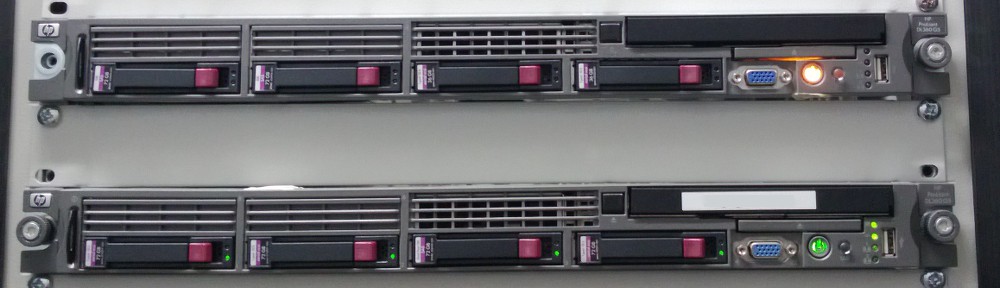
Teenage Mutant Wireless Dockstar …

(Blogged via flickr)

… well, wireless only in the sense that it serves as an AP with redundant uplinks :-) Can’t wait to test it next time I travel with Deutsche Bahn through the mobile IP diaspora that are the New German States (aka ‘Neufünfland’) to Berlin next week …

DIY: Multilink-3G-Gateway

As some of you might know, I’m not only a supporter of IP Everywhere (and a net addict), I’m as well a notorious user of IP anywhere – see my

Avatar on twitter, facebook, … As I’m usually at least once per month doing standby for the services we run at my employer’s place, I depend on access — and I prefer to have it rather reliable anywhere, if possible.
I do travel by train a lot these days, twice per week Güterloh – Berlin – Gütersloh, which takles about 3 hours per trip.

And since Deutsche Bahn as of now neglected the need of buisiness people in regards of Internet connectivity between Köln and Berlin (which is the relation of the trains I take), I’m stuck with trying to get GSM signals while speeding at up to 250 km/h trough what I’d call a diaspora of mobile Internet. While the ICE is equipped with GSM repeaters (not really sure if they actually work with UMTS’ frequencies as well) that cater at least for the networks of Deutsche Telekom (»D1«) and Vodafone (»D2«), GSM towers between Hannover and Berlin seem to be even less frequent than between Bielefeld and Hannover, where connectivity sometimes already is an issue.
I always thought about lining my access to D1 and D2 and maybe even o2 together to form a »best effort« access, regardless of the underlying network; just recently, @homofaber voiced a request for something similar on twitter, and I wrote down my ideas on that.

I am using OLSR for years now to link my home base(s) to the Internet, running OLSR on top of (Open)VPN links. OLRD was made for lossy wireless networks, recalculating the next hop based on a contemporary per-node view of the whole (mesh) network — constantly, based on active probes. But as any two nodes linked by more than one path can be seen as a tiny mesh, I still think this combination is quite cool — and it works well for quite some years now on backing up my main DSL connection. And as I recently got hold of two TP-Link MR-3020, cheap (<30,– EUR), OpenWRT-capable and USB-powered »3G Accesspoints« (which lack actual 3G hardware but expect that to be added via USB), I started this little project …
Last Friday I got the prototype going, which as of now consists of:

  • 1 MR3020 as 3G-OpenVPN-Router
  • 1 TL-WN821N USB-WiFi stick
  • 1 MR3020 as Access Point, wired to the first one
  • 2 Huawei E585 mobile 3G hotspots with SIMs for D1/D2
  • 1 battery with USB-outputs as a power supply (»EVOPower Black 2 USB Port Compact External Portable Rechargeable Emergency Backup Battery Charger (5000mAh)« off Amazon.com for 30 USD)

All in all, the equipment used is 60,– (2x MR3020) plus 10,– (TL-WN821N) plus 30,– (USB battery) plus 240,– (2x E585),

i. e. about 340,– EUR for a dynamic routing dual-uplink mobile accesspoint. Oops, not as cheap as planned :-)
So, why this setup? Well, the flash on the 3020 is tight; OpenVPN and support for 3G modems don’t fit into the available space with stock OpenWRT images, and I’m not sure if that can be changed by using a customized version of it. But the 3020 is one of the few hackable devices I know of that are run off USB power — and for mobile use, that 5000 mAh battery supplying 5V USB at up to 700 mA is rather nice. Since I already had the mobile 3G hotspots (one from my employer, one – actually, two – purchased by myself) and use them for standby duty already, utilizing them seemed to be a straight forward approach (even if that means I need 2 USB-chargers for Micro-USB and one for Mini-USB – the battery and the MR3020 use Mini – to power/charge the whole bunch). The WiFi-stick is needed as the Atheros radio/it’s current Linux drivers can’t do multipe times STA (station mode); in theory it at least should be capable of doing once STA and multiple times AP (access point mode), and previously, with the »madwifi« drivers for Atheros it actually worked. But for me, it did not work with bleeding edge OpenWRT »Attitude Adjustment« and »mac80211« at all, that’s why I use another MR3020, connected by a ethernet cable to the first, as the access point … I tried an unpowered USB hub and two TL-WN821N, but that’s too much for the 3020, it will just drop, reconnect, drop that hub and it’s devices. Haven’t found an USB-powered USB hub yet – and I don’t have spare sockets on my USB battery either.
So, while it works, it’s a bit experimental,

best to hide it in your backpack instead of lodging it onto the table in the train :-) As for 5% packetloss between Hannover and Bielefeld (about 100 km), this might be a bot too good, as the AP 3020 is actually using a OpenVPN-over-TCP tunnel — I initially set it up as an AP to run virtually anywhere after plugging it onto any network (trying proxies and using the HTTPS port in general). Thus, some of the packets might got redelivered via TCP-retransmissions of OpenVPN paylload; I’ll reconfigure it to use plain UDP.

I’m currently looking into using a Seagte Dockstar instead of both 3020, using either 3 WiFi sticks to create one AP and two STA devices or even go to one WiFi and two/three 3G/4G USB modems; funnily enough, you can power up a Dockstar by providing USB power instead of connecting in it’s 12V 2A power supply. Not sure what happens when using multiple USB devices; but the Dockstar ad least has enough flash (and RAM) for a more sophisticated setup :-)
So, whatch this space for future updates; I’d love to see how LTE would work here, especially since at least with D1, you shall be able to connect to urban 800 MHz LTE rollouts (where LTE is used instead of DSL) now, which might be better accessible from the ICE that the UMTS rollouts. So, anyone out there wanting to sponsor an LTE stick (or lend it for 4-8 weeks), please drop me a line :-)

Lack ab …

(Blogged via flickr)

Jetzt hat’s leider auch meine gerne genommene Sun-Kaffetasse erwischt, der Zahn der Zeit löscht die Rest der einstmals großen Sun Microsystems aus …

Provider und ihre vermeintlichen Pfründe

Als ich noch Angestellter bei Telefónica (O2 gehörte da schon zum Konzern) war, freute es mich, daß »mein Arbeitgeber« mal mit gutem Beispiel voranging und diesem ganzen Blödsinn mit »Internet Flatrate*«, sprich den Sternchen-Tarifen, mutig den Kampf ansagte, indem man VoIP, Instant Messaging u. dgl. mehr eben nicht mehr explizit vom »Internet« ausklammerte.
Vorbei diese Zeit ist es den Anschein hat:

Hallo zusammen,
hier einmal unsere internen Definitionen (aus der besagten Wissensdatenbank, auf die alle Mitarbeiter Zugang haben) zu dem Thema.
Big-Screen (Tethering nur mit Internet-Pack-L und Alttarifen)
Alle internetfähigen Geräte, die keine Möglichkeit bieten eine leitungsvermittelte Telefonieverbindung (also nicht VoIP) herzustellen. Hierzu gehören bspw. alle Surfsticks, Modems, Router, Huawei E5, etc.
Auch Tablet PCs ohne Telefoniefunktion gehören in diese Kategorie (z.B. Samsung Galaxy Tab Wifi)
Ausname: Das Apple iPad zählt zu den Small-Screen-Geräten obwohl keine Telefoniemöglichkeit besteht.
Small-Screen (Tethering mit allen Tarifen erlaubt)
Alle internetfähigen Geräte mit denen man über das Mobilfunknetz (leitungsvermittelt – nicht VoIP) telefonieren kann und das iPad. Es gehören also bspw. alle normalen Mobiltelefone und Smartphones dazu.
Tablet PCs wie das Samsung Galaxy Tab (mit dem man ja auch telefonieren kann…) gehören auch in diese Kategorie.
Noch Fragen?

 
Schon coole SäLeute da im O2-Marketing, oder? Statt konsequent zu sein: Sonderlocke für das iPad. Und da man über UMTS-Sticks ja durchaus auch telefonieren kann, fallen jene aus »alle Surfsticks« wieder raus. Hat sich auf dem Golfplatz wahrscheinlich noch nicht rumgesprochen ;)
Aber zum Glück kann mir diese Kleinkariertheit egal sein (und ist es mir ehrlich gesagt auch – wenn da »Internet« draufsteht, ist »Internet« drin, egal, was die Sterne sagen), denn ich mache i. d. R. nur VPN-Traffic zwischen meiner »Heimatbasis« und dem mobile Endgerät über die 3G-Verbindung. VoIP o. ä. mache ich mit meinen eigenen IPs, das ach-so-wertvolle Providernetz wird nur als Datentrampelpfad zwischen A und B eingesetzt — mithin so, wie gerade die Mobilfunker sich nie sehen woll(t)en, als reiner IP-Transport-Dienst. You get what you * for …

Fritz!OS: Stick-based telephony …

So, nachdem AVM die 7270 noch mit einer Labor-Firmware von »Fritz!OS« bedenkt – die nahezu baugleiche 7570 aber zum Alteisen stempelt (und alle so: »Schämt Euch!«) –, habe ich mal meine 3,6/0,38-Sticks (Huawei E210, E160, E1550) durch 7,2/5,8 MBit-fähige Sticks (E1750C) ersetzt und mit der Voice-Option rumgespielt.
Ja. Schon cool. Ich könnte jetzt mein Fritz!Box-Netzwerk so konfigurieren, daß Mobilfunkanrufe über diese Box mit FONIC-SIM rausgehen bzw. in GT als auch in B einen solchen stecken — erst nach dem Bucht-Kauf weiterer 7270er allerdings, denn AVM unterstützt die jüngere 7570, von der ich drei Boxen habe, ja nicht mehr.
9 Cent pro Minute ist günstiger als die deutlich über 10 Cent/Minute liegenden Tarife von sowohl Telekom als auch Alice. (Und bevor wieder jemand mosert: einen AGB-Verstoß (»unentgeltliche Überlassung an Dritte«) sehe ich nicht – der ganze Kram wird von einem, meinem, Konto gespeist, insofern ist meine Familie kein »Dritter« im rechtlichen Sinn; es sind (legitime) Nutzer meines Telefoniesetups.)
Allerdings sind 9 Cent/Minute brutto 155% der 5,8 Cent/Minute (inkl. Schäuble-Abgabe MwSt), die localphone.com verlangt (siehe Kommentare). Ich denke, ich werde den Anbieter mal parallel austesten …